The short answer
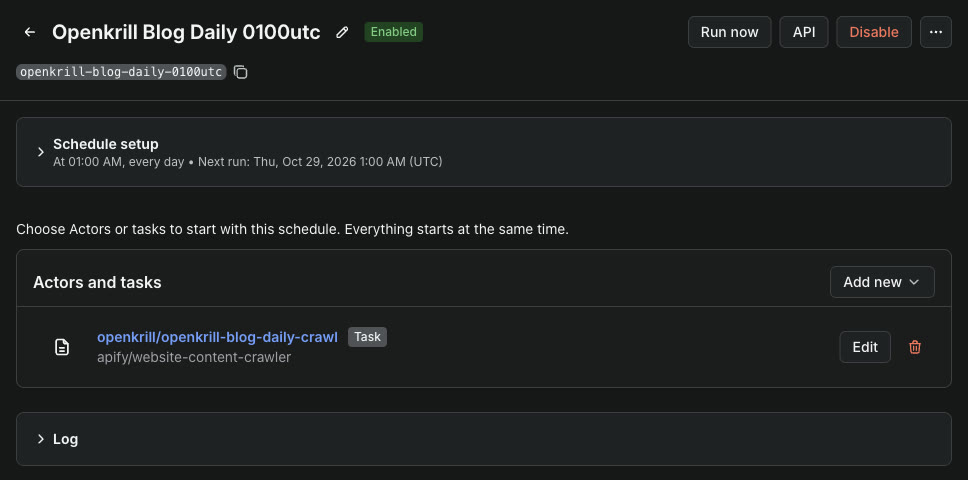
A task stores one actor with one input. A schedule starts the task on a cron line. Your own code then never starts anything. It reads the task's last successful run from the same address every time.
| Step | API call | What we got |
|---|---|---|
| Save the task | POST /v2/actor-tasks | Task "openkrill-blog-daily-crawl" |
| Add the schedule | POST /v2/schedules | Daily at 01:00 UTC, next run shown right away |
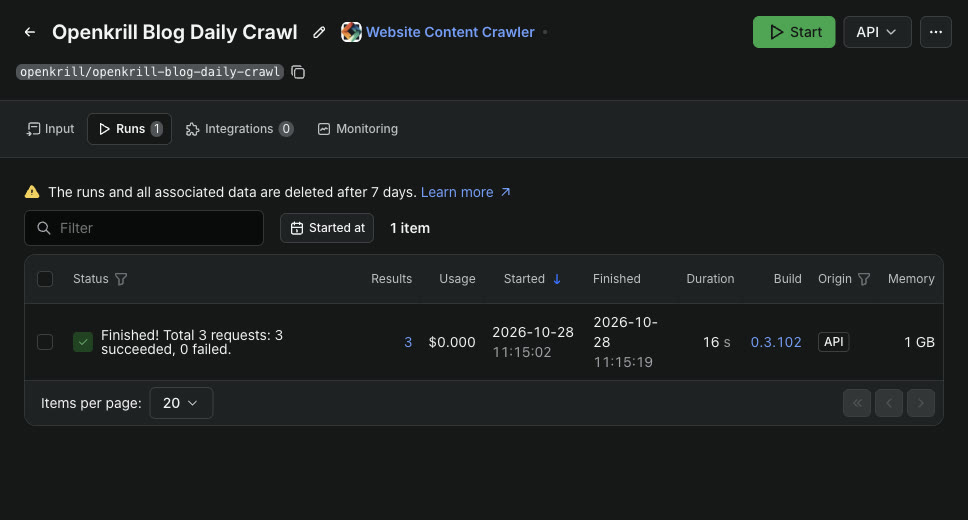
| Test run of the task | POST /v2/actor-tasks/ID/runs | 3 pages, 16.5 seconds, 0.0011 US dollars |
| Read the latest results | GET /v2/actor-tasks/ID/runs/last/dataset/items | 3 items in 1.9 seconds |
How we ran it
We used an Apify account on the free plan, its API token, and the Website Content Crawler with the same input as our one-off crawl test, cut to 3 pages.
- Save a task. The body names the actor, the memory, a 300-second timeout and the input. The answer holds the task ID.
- Add a schedule. The body holds the cron line, the time zone and one action that runs the task. We set
isExclusiveso a new run does not start while the last one is still going. - Test it once. We started the task by hand instead of waiting for 01:00 UTC. It finished with the status SUCCEEDED.
- Read the newest data. The
runs/lastaddress withstatus=SUCCEEDEDskips a run that failed, so a broken night does not leave you with an empty file.
curl -X POST -H "Authorization: Bearer $APIFY_TOKEN" -H "content-type: application/json" \
  https://api.apify.com/v2/actor-tasks -d '{
  "actId": "apify/website-content-crawler",
  "name": "openkrill-blog-daily-crawl",
  "options": { "memoryMbytes": 1024, "timeoutSecs": 300 },
  "input": { "startUrls": [{ "url": "https://tools.openkrill.app/blog/" }], "maxCrawlPages": 3 }
}'

curl -X POST -H "Authorization: Bearer $APIFY_TOKEN" -H "content-type: application/json" \
  https://api.apify.com/v2/schedules -d '{
  "name": "openkrill-blog-daily-0100utc",
  "cronExpression": "0 1 * * *",
  "timezone": "UTC",
  "isEnabled": true,
  "isExclusive": true,
  "actions": [{ "type": "RUN_ACTOR_TASK", "actorTaskId": "TASK_ID" }]
}'

curl -H "Authorization: Bearer $APIFY_TOKEN" \
  "https://api.apify.com/v2/actor-tasks/TASK_ID/runs/last/dataset/items?status=SUCCEEDED&clean=1"
The input above is shortened. Our task also kept the depth limit, the fast HTML crawler and the pattern that holds the crawl on our blog.
What buyers worry about, and what we found
"What does a daily job cost on the free plan?"
Our 3-page run cost 0.0011 US dollars, so 30 daily runs come to about 0.03 US dollars of the free plan's 5 US dollars a month. Most of the cost is the crawler starting, not the page count. Our 5-page run on the same plan cost 0.0012 US dollars.
"Will a slow run pile up behind the next one?"
Not with isExclusive on. The schedule then skips a start while the task's last run is still going.
"How long do the results stay?"
The task's Runs tab says runs and their data are deleted after 7 days on our plan. A daily job that reads runs/last each day is fine with that.
What this test does not show
- We started the task by hand and turned the schedule off after the test, so no run came from the schedule itself.
- We tested one small static site. A browser crawler or proxies cost more per run.
Frequently asked questions
How do I run an Apify actor every day?
Save the actor and its input as a task, then add a schedule with a cron line that runs the task. We did both with 2 API calls, and the console has the same forms.
How do I get the latest results of a scheduled Apify task?
Read /v2/actor-tasks/TASK_ID/runs/last/dataset/items?status=SUCCEEDED. It always points at the newest successful run. Ours answered in 1.9 seconds.
How much does a scheduled Apify crawl cost?
Our 3-page crawl cost 0.0011 US dollars per run, about 0.03 US dollars for a month of daily runs, on the free plan's 5 US dollars of monthly usage.
Sources
- Apify schedules: cron lines, time zones and the exclusive setting.
- Apify API reference: tasks, schedules and the last-run endpoints.